Gmail reads your emails to train its AI, and you probably haven't turned it off
Google has just crossed a line. And as so often, without fanfare. For a little while now, Gmail can automatically analyse the content of your messages and attachments, not to filter spam or offer you an automatic reply, but...

Gmail reads your emails to train its AI, and this is not just a technical detail
This is not just another harmless update. Over the past few days, several Gmail users have discovered that their settings were changed by default to let Google analyse the content of their emails and attachments in order to train its artificial intelligence models. Translation: your private correspondence becomes raw material for Gemini, the new in-house AI. And if you touch nothing, it is all switched on.
Officially, Google wants to improve Smart Compose or smart replies, those automatic suggestions that finish your sentences. Unofficially? It is a deep shift in what we still consider to be "our" data.
When the "privacy" box is ticked by default against you
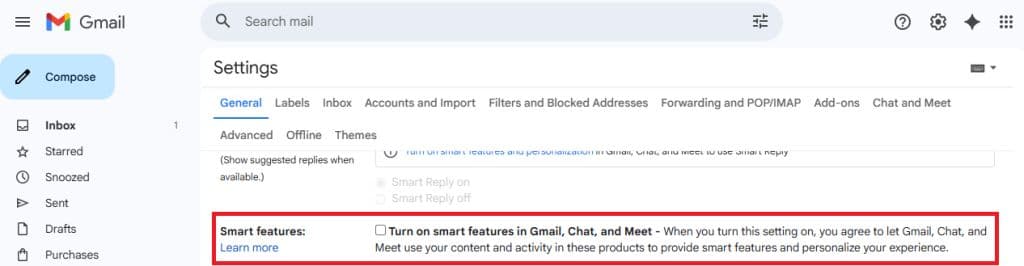
The most troubling part here is not the use of AI. It is the method. Google switched these settings on without asking for your explicit consent. No intrusive pop-up. No acceptance window. Just a ticked box, buried deep in the settings, that you will only find if you go actively looking for it.
This is a dark pattern: a gentle manipulation that relies on user inertia. They are betting you will change nothing. And Google wins that bet 99% of the time.
An AI that learns from your secrets
Let us be clear: these models are trained on the content of your messages, your attached files, your writing habits. Even if Google promises anonymisation and secure processing, this remains direct access to what you consider private.
This raises three major problems:
- Biased consent: you did not really agree. You were made to consent by default.
- Functional opacity: it is impossible to know how your data is used, where it is stored, by whom it will be re-read, corrected, or exploited.
- Snowball effect: if Google does it, others will follow. And tomorrow it will be your work messages, your legal documents, your medical conversations.

What this says about the future of our relationship with the digital world
This is not a technical question. It is a question of digital civilisation.
We live in an age where technology moves faster than the legislative, ethical or civic safeguards. When you use Gmail, you are not just a customer: you are a training vector for AIs that know you better than you know yourself.
We are promised productivity gains, more relevant assistants, a smoother digital life. In reality, we are being stripped of cognitive sovereignty over what we write, think and share.
How should we react? It is not just a matter of a setting
Most articles will tell you "how to turn off" this feature. That is useful. But not enough.
What we need is to raise the level of public debate around what must remain inalienable in a digital world.
- Your messages should never be analysed without your explicit, and informed, consent.
- An AI should not be able to be fed on private conversations without individual consent.
- The digital giants must take on duties of loyalty towards users they know to be passive, sometimes vulnerable, often poorly informed.
A digital culture to (re)build
This subject ties in with what I defend in my book Être en cybersécurité: you cannot protect what you do not understand.
Every time a platform pushes its users towards more simplicity at the expense of control, it chips away at their autonomy. And every time we give ground on these small details, a box ticked here, a vague authorisation there, we build a society of technological dependency.
Yet a healthy digital democracy rests on three pillars:
- Transparency in the rules of the game,
- Informed consent from users,
- The ability to refuse without functional penalty.
So, what should we do?
- Go into your Gmail settings and turn off the "Smart Features" and "Workspace Smart Features" functions (they are in two different places).
- Inform those around you, your colleagues, your clients. If you manage sensitive data for others, you have a responsibility.
- Ask the question to your digital providers: where does my data go, who reads it, what for?
- Campaign for strong European regulation on the use of personal data for AI training purposes. The GDPR was a first step. It is time to move to the next one.
This is not a battle against artificial intelligence. It is a battle for a human intelligence of the digital world.
Because a tool, however powerful it may be, should never decide for you what it does with your privacy.
Questions fréquentes
What does Gmail do with my emails for AI?
Gmail can automatically analyse the content of your messages, your attachments and your writing habits to train Google's artificial intelligence models, notably in order to improve functions such as Smart Compose and smart replies.
Is this analysis switched on by default?
Yes. According to the article, the settings were switched on by default, with no request for explicit consent and no acceptance window: the box is ticked and you have to go looking for it to turn it off.
How do I turn off this feature?
Go into your Gmail settings and turn off the "Smart Features" and "Workspace Smart Features" functions, which are in two different places.
Why does the author believe that turning the option off is not enough?
Because the issue goes beyond the individual setting: he suggests informing those around you and your clients, questioning your providers about how the data is used, and campaigning for strong European regulation on training AI from personal data.

L’auteur
Christophe MazzolaJ’écris sur la cybersécurité telle qu’elle se vit vraiment : gouvernance, facteur humain, et tout ce que les rapports d’audit n’osent pas dire au COMEX. Auteur de « Être en cybersécurité ».

Être en cybersécurité
Une feuille de route cyber en clair, pour tout le monde, pas seulement les experts.